


[主板]如何开启或者关闭安全开机(Secure Boot)
目录
(如下举例:ROG MAXIMUS Z790 HERO,不同的主板和BIOS版本可能会有差异)
1. 开机后,立刻按压键盘上的“delete”键,进入BIOS [Advanced Mode],参考如下图片

2. 点选[Boot]页面,参考如下图片

3. 点选[Secure Boot]选项,参考如下图片

4. [OS Type]选项默认设置为Other OS
Other OS:安全开机状态关闭
Windows UEFI mode:安全开机状态开启

5. BIOS选项设置下,Secure Boot 实际对应状态
BIOS下Secure Boot State:此项默认灰选,无法手动修改,状态随是否有Secure Boot Keys改变。
User:有Secure Boot Keys;
Setup:没有Secure Boot Keys
Secure Boot Mode 设置为Standard时,Key Management选项灰选,无法设置
| BISO下Secure Boot State | OS Type | Secure Boot Mode | Key Management | 系統下Secure Boot State |
| User | Other OS | Customer | Default | 关闭 |
| User | Other OS | Standard | N/A | 关闭 |
| Setup | Other OS | Customer | Clear Secure Boot Keys | 关闭 |
| Setup | Windows UEFI mode | Customer | Clear Secure Boot Keys | 关闭 |
| User | Windows UEFI mode | Customer | Default | 开启 |
| User | Windows UEFI mode | Standard | N/A | 开启 |
1. 系统下同时按压键盘[WIN]+[R]键,输入msinfo32

2. 找到[安全开机状态],如关闭,表示Secure Boot 关闭
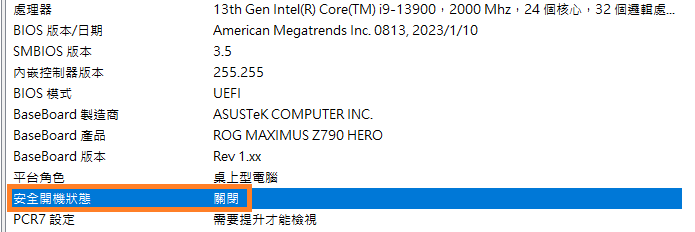
如开启,表示Secure Boot 開啟

参考:https://rog.asus.com.cn/support/faq/1049829/
惠普电脑U盘启动引导设置:https://www.hao0564.com/4714.html